

Guide

1200X 7-Inch Digital LCD Microscope for Mobile Repair & Soldering

1200X 7-Inch Digital LCD Microscope for Mobile Repair & Soldering
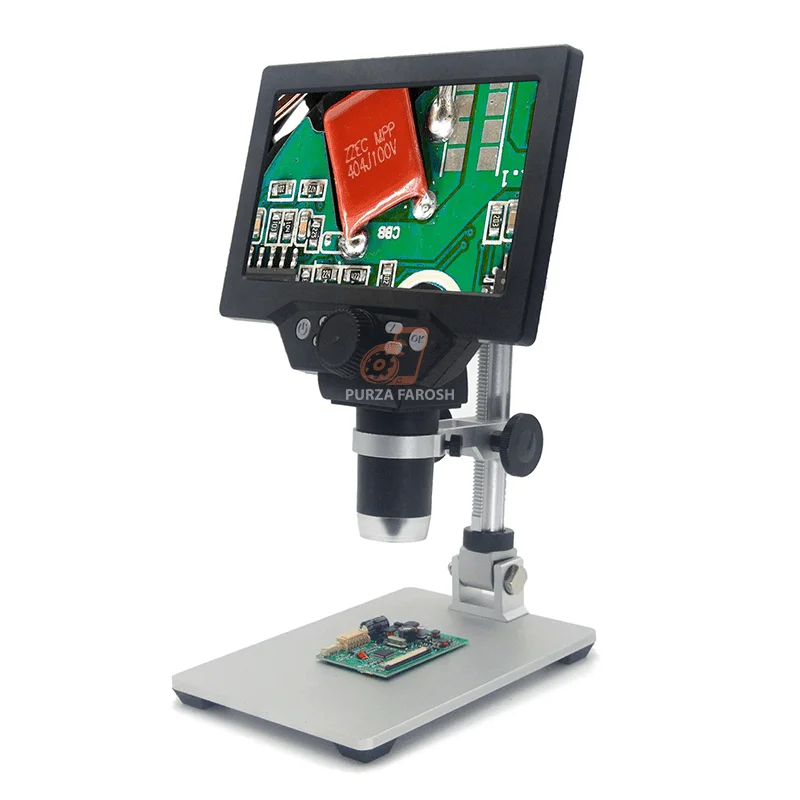
1200X 7-Inch Digital LCD Microscope for Mobile Repair demands more precision than ever. Smartphone motherboards, SMD components, solder joints, connectors, IC areas, and PCB traces are extremely small, making them difficult to inspect with the naked eye.

This is where a 1200X Digital Microscope can become a useful addition to a professional repair workstation.

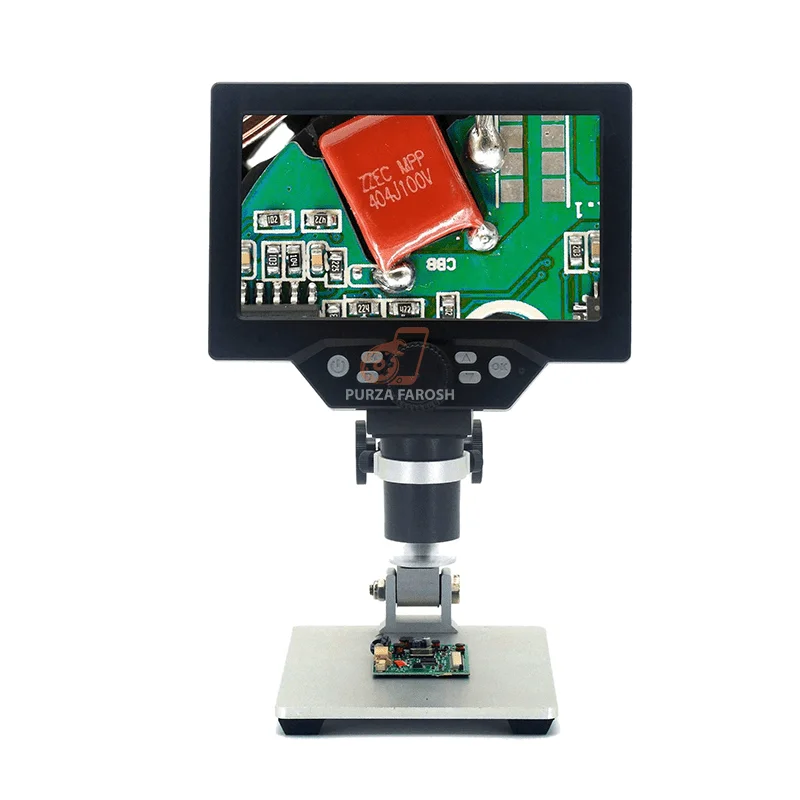
The 1200X 7-Inch Digital HD LCD Microscope for Soldering available at Purzafarosh is designed for detailed electronics observation and soldering-related work. Its built-in LCD allows technicians to view small components on a screen rather than relying only on conventional handheld magnification. The product listing also includes adjustable lighting, HDR settings, exposure compensation, continuous shooting, and image-quality controls.

For technicians searching for a digital microscope for soldering, mobile repair, or electronics inspection, the most important question isn’t simply how high the advertised magnification is. Image clarity, lighting, working space, stability, and suitability for the repair task can matter just as much.

Quick Answer: Is a 1200X Digital Microscope Good for Mobile Repair?

A 1200X digital LCD microscope can be useful for mobile phone repair and electronics inspection because it helps technicians view small components, solder joints, PCB areas, and connectors more clearly on a screen.

However, a microscope’s usefulness depends on the repair task. For some types of detailed motherboard work, factors such as optical quality, working distance, lighting, and comfortable tool access may matter more than the highest advertised magnification.

Purzafarosh’s mobile repair microscope guidance similarly emphasizes that technicians should consider practical working conditions instead of choosing a microscope based only on the highest advertised magnification.

What Is a 1200X Digital LCD Microscope?

A digital LCD microscope uses a camera system to capture a magnified view of an object and display it on an integrated screen.

Unlike a traditional optical microscope, where the technician generally looks through eyepieces, a digital microscope lets the user view the work area on an LCD.

This can be useful during electronics work because technicians may need to inspect:

  • Small solder joints
  • SMD components
  • PCB traces
  • Connectors
  • IC areas
  • Motherboard components
  • Corrosion or visible damage
  • Fine electronic assemblies

The 1200X 7-inch digital microscope listed by Purzafarosh is positioned for soldering and detailed electronics work. The product includes settings for screen saving, light-source frequency, HDR, exposure compensation, date display, continuous shooting, photo quality, and adjustable light brightness.

Why Use a Digital Microscope for Soldering?

Soldering electronic components without proper visibility can make detailed work more difficult.

A soldering microscope helps technicians see small areas more clearly when inspecting a board or component.

For example, magnification may help identify:

Poor Solder Joints

A solder connection may appear acceptable from a distance but show visible issues under magnification.

Small Component Placement

Modern electronic boards contain extremely small components. Better visual inspection can help technicians check positioning before and after a repair.

PCB Damage

Fine PCB traces, damaged pads, corrosion, or surface contamination can be difficult to inspect without magnification.

Connector Inspection

Charging connectors and other small electronic connectors may contain tiny pins and contact points that require careful visual examination.

This is why a digital microscope for soldering can be a valuable part of a professional electronics workstation.
For a broader understanding of equipment used by technicians, you can internally link this section to your relevant Purzafarosh guide, such as Best Mobile Repairing Tools in Pakistan.

How a 7-Inch LCD Screen Can Improve Inspection

One of the main practical features of a digital microscope is its display.

A 7-inch LCD microscope provides a dedicated screen for observing the working area.
This may help technicians who prefer viewing their work without constantly looking through microscope eyepieces.

Potential advantages include:

  • Larger visual viewing area

  • Easier demonstration of repair work

  • Screen-based inspection

  • Better visibility for training environments

  • Convenient observation of small components
A screen-based setup can also help technicians keep their attention on the work area while viewing the magnified image.

However, the screen alone does not determine microscope quality. Lighting, image stability, camera performance, and the physical workspace are also important.

Digital Microscope for Mobile Phone Repair

Mobile phone repair includes many different tasks, and not every task requires the same level or type of magnification.

A mobile repair microscope can be useful for detailed inspection involving:

  • Motherboard examination

  • SMD soldering inspection

  • PCB repair

  • IC-area observation

  • Connector inspection

  • Fine electronic components

  • Visual quality checks
Purzafarosh specifically positions its digital microscope category for mobile repair, PCB inspection, motherboard repair, IC work, and soldering inspection.

This makes a digital microscope particularly relevant for technicians building a more organized professional workstation.

For internal linking, you can naturally add:

Explore digital microscopes in Pakistan for mobile repair and electronics inspection.

Important Features to Consider in an Electronics Inspection Microscope

When buying an electronics inspection microscope, do not focus only on the maximum magnification number.
Consider the following factors.

1. Image Clarity

Higher advertised magnification isn’t always more useful if the image becomes hard to interpret.
Clear and stable visual output is often more practical than simply increasing magnification.

2. Lighting

Electronic components can reflect light, especially metallic surfaces.
A microscope with adjustable illumination helps technicians adjust visibility to the object being inspected.
The Purzafarosh product listing includes a light brightness regulator, allowing users to adjust illumination according to their working conditions.

3. Working Space

Technicians performing soldering need enough physical space to use:

  • Tweezers

  • Soldering tools

  • PCB holders

  • Cleaning tools
Before purchasing, consider whether the microscope design provides sufficient room for your normal workflow.

4. Stability

A stable setup can make detailed inspection easier.
Movement or vibration can make fine electronic work harder, especially when observing very small components.

5. Display Size

A larger display may provide a more comfortable viewing experience for some users.
A 7-inch digital microscope offers a compact, screen-based setup without requiring an additional monitor.

1200X Digital Microscope vs Stereo Microscope

A common mistake is assuming that all microscopes used for electronics repair work are the same.

They are not.

Digital LCD Microscope

A digital microscope displays the magnified image on a screen.

It may be useful for:

  • General inspection

  • Screen-based observation

  • Electronics work

  • Documentation and visual review

  • Compact repair setups

Stereo Microscope
A stereo microscope typically provides direct optical viewing and can offer depth perception.
Advanced technicians may prefer stereo or trinocular systems for certain high-precision motherboard repairs.

Purzafarosh’s buying guidance distinguishes between digital and stereo/trinocular microscope setups and recommends choosing based on the actual repair workflow rather than simply selecting the highest magnification.

So, if you’re looking for a digital microscope for soldering, a screen-based model may be suitable. If your work involves advanced, continuous motherboard-level repair, you should compare optical systems, working distance, and ergonomics before choosing.
1200X 7-Inch Digital LCD Microscope for Mobile Repair & Soldering

How a 7-Inch LCD Screen Can Improve Inspection

One of the main practical features of a digital microscope is its display.

A 7-inch LCD microscope provides a dedicated screen for observing the working area.

This may help technicians who prefer viewing their work without constantly looking through microscope eyepieces.

Potential advantages include:

  • Larger visual viewing area
  • Easier demonstration of repair work
  • Screen-based inspection
  • Better visibility for training environments
  • Convenient observation of small components

A screen-based setup can also help technicians keep their attention on the work area while viewing the magnified image.

However, the screen alone does not determine microscope quality. Lighting, image stability, camera performance, and the physical workspace are also important.

Digital Microscope for Mobile Phone Repair

Mobile phone repair includes many different tasks, and not every task requires the same level or type of magnification.

A mobile repair microscope can be useful for detailed inspection involving:

  • Motherboard examination
  • SMD soldering inspection
  • PCB repair
  • IC-area observation
  • Connector inspection
  • Fine electronic components
  • Visual quality checks

Purzafarosh specifically positions its digital microscope category for mobile repair, PCB inspection, motherboard repair, IC work, and soldering inspection.

This makes a digital microscope particularly relevant for technicians building a more organized professional workstation.

For internal linking, you can naturally add:

Explore digital microscopes in Pakistan for mobile repair and electronics inspection.


Important Features to Consider in an Electronics Inspection Microscope

When buying an electronics inspection microscope, do not focus only on the maximum magnification number.

Consider the following factors.

1. Image Clarity

Higher advertised magnification isn’t always more useful if the image becomes hard to interpret.

Clear and stable visual output is often more practical than simply increasing magnification.

2. Lighting

Electronic components can reflect light, especially metallic surfaces.
A microscope with adjustable illumination helps technicians adjust visibility to the object being inspected.

The Purzafarosh product listing includes a light brightness regulator, allowing users to adjust illumination according to their working conditions.

3. Working Space

Technicians performing soldering need enough physical space to use:

  • Tweezers
  • Soldering tools
  • PCB holders
  • Cleaning tools

Before purchasing, consider whether the microscope design provides sufficient room for your normal workflow.

4. Stability

A stable setup can make detailed inspection easier.

Movement or vibration can make fine electronic work harder, especially when observing very small components.

5. Display Size

A larger display may provide a more comfortable viewing experience for some users.
A 7-inch digital microscope offers a compact, screen-based setup without requiring an additional monitor.


1200X Digital Microscope vs Stereo Microscope

A common mistake is assuming that all microscopes used for electronics repair work are the same.

They are not.

Digital LCD Microscope

A digital microscope displays the magnified image on a screen.

It may be useful for:

  • General inspection
  • Screen-based observation
  • Electronics work
  • Documentation and visual review
  • Compact repair setups

Stereo Microscope

A stereo microscope typically provides direct optical viewing and can offer depth perception.

Advanced technicians may prefer stereo or trinocular systems for certain high-precision motherboard repairs.

Purzafarosh’s buying guidance distinguishes between digital and stereo/trinocular microscope setups and recommends choosing based on the actual repair workflow rather than simply selecting the highest magnification.

So, if you’re looking for a digital microscope for soldering, a screen-based model may be suitable. If your work involves advanced, continuous motherboard-level repair, you should compare optical systems, working distance, and ergonomics before choosing.

Useful Applications in a Mobile Repair Workshop

A 1200X digital microscope can support several workshop activities.

PCB Inspection

Technicians can inspect visible PCB areas and small electronic components more clearly.

Soldering Inspection

After soldering, magnification helps with visual inspection of the completed work.

Connector Examination

Small connector pins and contact areas can be difficult to inspect without magnification.

Motherboard Repair

Detailed visual inspection can help technicians identify visible issues before deciding on the next diagnostic step.

Training and Learning

A screen-based microscope may also help trainees see small components.

However, visual inspection should be part of a complete diagnostic process. A microscope cannot replace proper electrical testing.

Technicians may also require equipment such as a digital multimeter, soldering station, hot-air rework station, PCB holder, test probes, and other specialized mobile phone repair tools.

Purzafarosh’s China tools guide describes a practical motherboard workstation as a combination of multiple tools, including a digital microscope, tweezers, soldering equipment, multimeters, PCB holders, and related accessories.


How to Use a Digital Microscope More Effectively

Getting useful results from a microscope depends on the setup.

Step 1: Stabilize the Work Area

Place the device or PCB securely before inspection.
Avoid letting the board move while you work.

Step 2: Adjust the Lighting

Too much light can create reflections, while insufficient light can hide important details.
Adjust brightness until the object is clearly visible.

Step 3: Set a Practical Viewing Level

Do not automatically use maximum magnification.
Start with a wider view and increase magnification only when necessary.
This can make it easier to locate the exact area you want to inspect.

Step 4: Maintain Working Space

Before beginning soldering, make sure you have enough room to use your tools safely.

Step 5: Inspect Before and After Repair

A useful workflow can include:

  1. Visual inspection

  2. Electrical diagnosis where required

  3. Repair

  4. Post-repair visual inspection

  5. Functional testing
This approach separates visual observation from electrical diagnosis.


Is This Microscope Suitable for Beginners?

A digital LCD microscope can help beginners because viewing the magnified object on a screen can feel more familiar than working through traditional optical eyepieces.

However, beginners should understand that a microscope does not automatically make someone a professional technician.

Learning still requires:

  • Electronics knowledge

  • Correct soldering technique

  • Proper diagnosis

  • Tool safety

  • Understanding of components

  • Practical repair experience
A microscope is best viewed as a tool that improves visibility.

For technicians building a repair toolkit, you can internally link to your broader guide:


How to Choose the Right Digital Microscope

Before purchasing, ask yourself the following questions.

What Type of Repair Do I Perform?

General inspection, soldering, PCB repair, and advanced motherboard repair may have different requirements.

Do I Prefer a Screen-Based Setup?

If you prefer looking at an LCD, a digital microscope may be a practical option.

How Much Working Space Do I Need?

Consider whether you will use soldering tools under the microscope.

Is Lighting Adjustable?

Lighting can significantly affect visibility when working with reflective electronic components.

Am I Buying Based Only on Magnification?

Avoid selecting a microscope only because it advertises a very high magnification number.

A balanced combination of image quality, lighting, workspace, stability, and usability can be more valuable for regular repair work.

Frequently Asked Questions

What is a 1200X digital microscope?

A 1200X digital microscope is a screen-based magnification device that displays detailed views of small objects for inspection and related applications.

Is a digital microscope useful for soldering?

Yes, a digital microscope for soldering helps technicians inspect small components and soldered areas more clearly.

Can this microscope be used for mobile repair?

The Purzafarosh product is positioned for soldering and electronics work, while the site’s digital microscope category specifically targets mobile repair, PCB inspection, motherboard repair, IC work, and soldering inspection.

Is a digital microscope better than a stereo microscope?

Neither is automatically better for every task. Digital microscopes provide screen-based viewing, while stereo microscopes offer direct optical viewing and can be preferred for some advanced precision workflows.

What should I check before buying a soldering microscope?

Check image clarity, display size, lighting, working distance, available workspace, stability, and suitability for your specific repair tasks.

Final Thoughts

The 1200X 7-Inch Digital LCD Microscope for Mobile Repair & Soldering can be a useful tool for technicians who need a clearer view of small electronic components.

Its screen-based design makes it relevant for electronics inspection, soldering observation, PCB examination, and general mobile repair workflows.

The best microscope isn’t necessarily the one with the highest advertised magnification. A practical choice should balance visibility, lighting, stability, working space, and compatibility with your repair process.

For technicians building a professional workstation, a digital microscope can work alongside other essential mobile phone repair tools, including multimeters, soldering stations, hot-air rework equipment, tweezers, and PCB accessories.

You can explore related tools and equipment through:

Leave a Reply

Your email address will not be published. Required fields are marked *