



RELIFE XA1 USB Current & Voltage Tester for Mobile Repair

When diagnosing charging problems in smartphones and other USB-powered devices, simply checking whether a device is charging is often not enough. A technician may need to know how much voltage and current is actually passing through the charging connection.
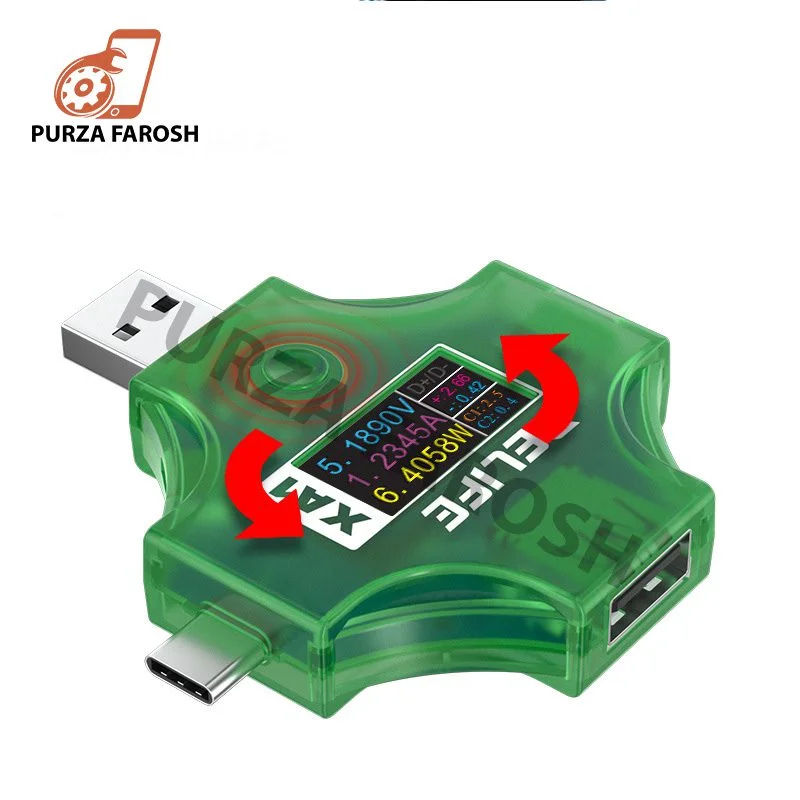
The RELIFE XA1 USB Current & Voltage Tester is a multifunctional USB testing device designed to measure electrical parameters and help technicians inspect charging performance. It supports voltage measurement from 4V to 25V, current measurement up to 5A, and provides 0.01V voltage resolution and 0.01A current resolution. The device also supports electricity and energy statistics and can detect several charging protocols.
For technicians working with mobile repairing tools, chargers, USB cables, power banks, and charging-related faults, a compact current and voltage tester can provide useful information during diagnosis.
This guide explains what the RELIFE XA1 does, its specifications, supported charging protocols, how to use it, and what to consider when using it for mobile repair and charging diagnostics.
What Is the RELIFE XA1 Current & Voltage Tester?
The RELIFE XA1 is a multifunctional USB current and voltage tester designed to monitor electrical parameters during USB-powered connections.
Instead of relying only on a phone’s charging icon, the tester provides measurable information about the electrical connection.
According to the available XA1 documentation, the tester supports:
- Voltage measurement from 4V to 25V
- Current measurement up to 5A
- 0.01V voltage resolution
- 0.01A current resolution
- Voltage accuracy of approximately ±1%
- Current accuracy of approximately ±1%
- Wh and Ah statistics
- Energy measurement up to 9999Wh
- Capacity measurement up to 9999Ah
- IPS display
- Multiple charging protocol detection
- Bidirectional current detection
These features make the XA1 more than a basic USB voltage meter. It is designed to provide multiple measurements from a compact testing device.
Why Use a Current and Voltage Tester for Mobile Repair?
Charging faults can have several possible causes.
A smartphone may fail to charge because of:
- Damaged charging cable
- Faulty charger
- Dirty or damaged charging port
- Charging circuit problems
- Battery-related issues
- Incompatible charging equipment
- Unstable power delivery
- Other hardware faults
A technician needs diagnostic information before deciding where the problem is located.
A USB current and voltage tester can help by showing the electrical values present during a charging connection.
For example, if a device is connected to a charger but the measured electrical behavior is different from what is expected, the technician has additional information to investigate the charger, cable, connector, or device.
The tester does not automatically identify every fault. Instead, it provides measurement data that can support the diagnostic process.
RELIFE XA1 Specifications
The following specifications are documented for the XA1 model:
| Specification | RELIFE XA1 |
|---|---|
| Model | XA1 |
| Voltage Range | 4V–25V |
| Maximum Current | 5A |
| Voltage Resolution | 0.01V |
| Current Resolution | 0.01A |
| Voltage Accuracy | ±1% |
| Current Accuracy | ±1% |
| Energy Measurement | Up to 9999Wh |
| Capacity Measurement | Up to 9999Ah |
| Statistics | Wh / Ah |
| Display | IPS |
| Supported Protocols | PD, QC2.0, QC3.0, SCP, AP 2.4A, DCP |
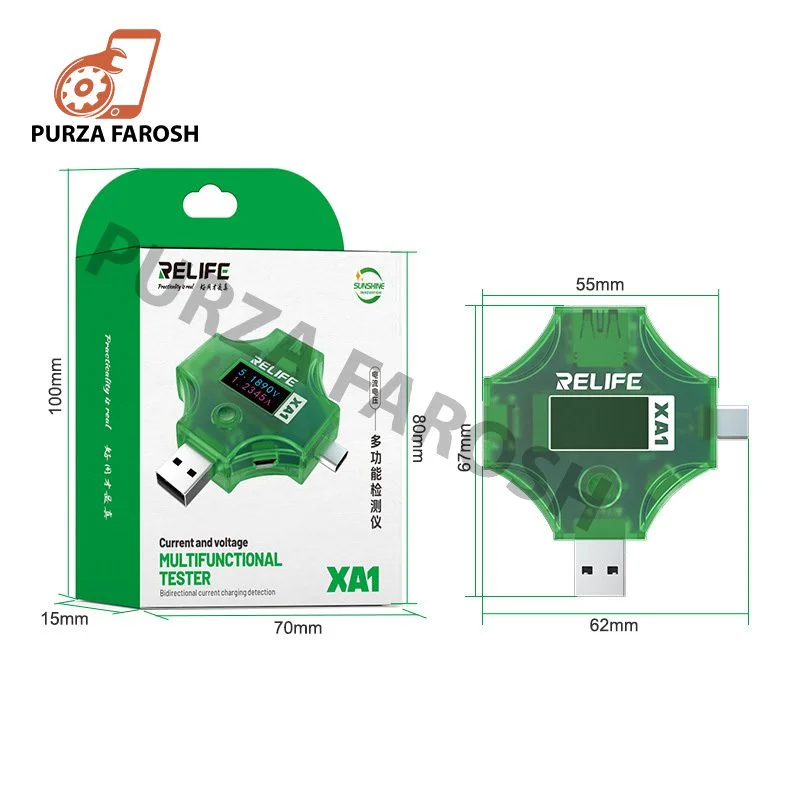
| Interface | USB-A, USB-C and Micro-USB connections depending on configuration |
These specifications come from the available XA1 instruction documentation.
4V–25V Voltage Measurement
One of the main functions of the RELIFE XA1 is voltage measurement.
The device supports a 4V to 25V measurement range, which provides useful coverage for common USB charging and power-testing applications.
Voltage measurement can help technicians understand what voltage is being delivered through the connection.
For charging diagnostics, this can be useful when checking:
- USB chargers
- Charging cables
- Power banks
- USB power sources
- Mobile phone charging connections
- Fast-charging behavior
The 0.01V resolution allows the display to show voltage changes with relatively fine increments.
However, technicians should remember that measurement results are dependent on the actual connection, equipment, and test conditions.
Up to 5A Current Measurement
Current is another important parameter when diagnosing USB charging.
The RELIFE XA1 supports current measurement up to 5A, with 0.01A resolution. Its documented current accuracy is approximately ±1%.
Current measurement can provide additional information about how much electrical current is flowing through the tested connection.
This can be particularly useful when comparing charging behavior between:
- Different chargers
- Different USB cables
- Different devices
- Different charging modes
The measured value should always be interpreted according to the device, charger, cable, protocol and operating conditions rather than treated as a universal target.
Fast Charging Protocol Detection
One of the useful features of the XA1 is its support for several charging protocols.
The documented supported protocols include:
- PD
- QC2.0
- QC3.0
- SCP
- AP 2.4A
- DCP
This can help technicians identify the charging protocol involved during testing.
For mobile phone repair, protocol information can be useful because different chargers and devices may negotiate different charging modes.
However, protocol detection should not be confused with proving that a device’s battery or charging circuit is healthy. It is one diagnostic input among several.
Bidirectional Current Detection
The RELIFE XA1 also supports forward and reverse, or bidirectional, current detection according to the available product documentation.
This provides additional flexibility when testing different USB connection arrangements.
For technicians working with modern USB connections, having a tester that can accommodate different connection directions can make testing more convenient.
The exact behavior still depends on how the tester and connected equipment are configured.
IPS Display for Easier Monitoring
The XA1 uses an IPS display for presenting measurement information. The available specifications list a 160 × 80 display specification.
A clear digital display is important when monitoring voltage, current, energy, and other information during testing.
The XA1 documentation also describes a function button that can be used to change the display interface and flip the display orientation by 180 degrees.
This can be useful when the tester is connected in different physical orientations.
Wh and Ah Measurement
The RELIFE XA1 can also record electrical statistics using Wh and Ah measurements.
The documented ranges extend up to:
- 9999Wh energy measurement
- 9999Ah capacity measurement
These measurements can provide additional information during longer testing sessions.
For example, a technician can use accumulated measurement data when examining power usage during a test rather than looking only at an instantaneous voltage or current reading.
How to Use the RELIFE XA1 for Charging Testing
Using the tester is relatively straightforward, but the exact connection should match the connector and device being tested.
Step 1: Identify the Connection
Determine whether your setup uses USB-A, USB-C, or Micro-USB.
The XA1 documentation identifies USB-A, USB-C and Micro-USB interfaces/plugs as part of the tester’s connection system.
Step 2: Connect the Tester
Place the tester between the relevant power source and the device or cable being tested, according to the required connection direction.
Step 3: Turn On the Power
Connect the charger or USB power source.
The tester should begin displaying the relevant electrical information.
Step 4: Monitor Voltage
Observe the voltage reading and note any changes during the charging process.
Step 5: Monitor Current
Check the current measurement to see how much current is flowing through the connection.
Step 6: Check Charging Protocol
If applicable, observe whether the tester identifies a supported charging protocol.
Step 7: Record the Results
For professional troubleshooting, recording the measurements can help compare different chargers, cables, or devices.
ow the RELIFE XA1 Can Help With Mobile Charging Diagnosis
A mobile phone charging tester can be useful as part of a broader diagnostic workflow.
For example, if a phone appears to charge slowly, a technician can test the charging setup and compare the electrical behavior with another known-good charger or cable.
A basic diagnostic workflow can look like this:
Charger → RELIFE XA1 → USB Cable → Device
The technician can then observe the voltage and current measurements while the device is connected.
If the readings change unexpectedly, further investigation may be necessary.
This is why the XA1 should be viewed as a diagnostic measurement tool, not as a device that independently identifies every charging fault.
RELIFE XA1 for Mobile Repair Technicians
For technicians building a professional mobile repairing tools collection, measurement equipment is an important part of the overall workstation.
A typical mobile repair setup may include:
- Soldering station
- Hot air rework station
- DC power supply
- Digital multimeter
- Microscope
- PCB holder
- Precision screwdrivers
- Tweezers
- ESD protection equipment
- Charging testers
- USB testing tools
The RELIFE XA1 fits into the charging and USB-testing portion of this toolkit.
Purzafarosh’s existing mobile-repair content also covers broader tool categories and explains how technicians can build a repair toolkit based on their experience and repair requirements
RELIFE XA1 vs Basic USB Tester
A basic USB tester may primarily display voltage and current.
The XA1 adds several additional functions, including protocol detection, bidirectional current detection, Wh/Ah statistics, energy and capacity measurement, and a display-orientation function.
| Feature | Basic USB Tester | RELIFE XA1 |
|---|---|---|
| Voltage measurement | Common | Yes |
| Current measurement | Common | Yes |
| Voltage resolution | Model dependent | 0.01V |
| Current resolution | Model dependent | 0.01A |
| Fast-charge protocol detection | Model dependent | Yes |
| Wh measurement | Model dependent | Yes |
| Ah measurement | Model dependent | Yes |
| Bidirectional current detection | Model dependent | Yes |
| Display rotation | Model dependent | Yes |
The actual capabilities of a basic tester vary by model, so this comparison is intended as a general category comparison rather than a claim about every USB tester.
What Should You Check Before Buying a USB Current Tester?
If you’re looking for a USB current and voltage tester for mobile repair, consider the following factors.
Measurement Range
Check whether the tester’s voltage and current ranges match your intended applications.
Resolution
Higher resolution can make smaller changes easier to observe, although resolution should not be confused with measurement accuracy.
Accuracy
Look for documented accuracy specifications rather than relying only on the number of digits shown on the display.
Charging Protocol Support
If you work with fast-charging devices, protocol detection can be a useful additional function.
Connector Compatibility
Make sure the tester supports the USB connection types you commonly use.
Display
A clear screen can make measurements easier to monitor during repair and diagnostic work.
Measurement Statistics
Wh and Ah tracking can be useful when you need more than an instantaneous voltage/current reading.
Common Mistakes When Testing Mobile Chargers
Even with a multifunction tester, technicians should avoid several common mistakes.
Using Damaged Cables
A damaged cable can produce unreliable or inconsistent testing results.
Testing Without a Known-Good Reference
If possible, compare questionable equipment with a known-good charger, cable, or device.
Treating One Reading as a Final Diagnosis
Voltage and current readings are useful evidence, but they do not automatically identify every hardware fault.
Ignoring the Charging Protocol
Modern charging systems can negotiate different power modes, so protocol information may be relevant when interpreting measurements.
Exceeding the Tester’s Specifications
Never intentionally test beyond the manufacturer’s stated measurement range.
Frequently Asked Questions
What is the RELIFE XA1 used for?
The RELIFE XA1 is used to measure USB voltage and current and to monitor additional charging and power parameters. It can also detect several supported charging protocols.
What is the voltage range of the RELIFE XA1?
The documented voltage measurement range is 4V to 25V.
How much current can the RELIFE XA1 measure?
The XA1 is specified for current measurement up to 5A.
What charging protocols does the XA1 support?
The documented protocols include PD, QC2.0, QC3.0, SCP, AP 2.4A and DCP.
Can the RELIFE XA1 measure charging current?
Yes. It supports current measurement with a documented resolution of 0.01A.
Can the XA1 be used for mobile phone repair?
Yes, it can be incorporated into a mobile repair diagnostic setup for USB charging and power measurements. It should be used as a measurement tool alongside other appropriate mobile repairing tools.
Does the RELIFE XA1 measure energy?
Yes. The documented specifications include energy measurement up to 9999Wh and capacity measurement up to 9999Ah.